New loan refinancing calculator: see your savings in a minute
Loans get cheaper and more expensive as central banks move their rates — and a loan that made sense a couple of years ago can be overpriced today. We have launched a loan refinancing calculator: it compares your current loan with a new one and honestly shows whether switching is worth it.
Why it matters
Refinancing means paying off an existing loan with a new one, usually at a lower rate. A difference of 2 percentage points on a large balance is a five-figure saving in dollars or euros — but switching has costs, too: fees, insurance and your time. The calculator boils everything down to two numbers: your monthly savings and your total savings over the term, net of arrangement costs.
How to use it
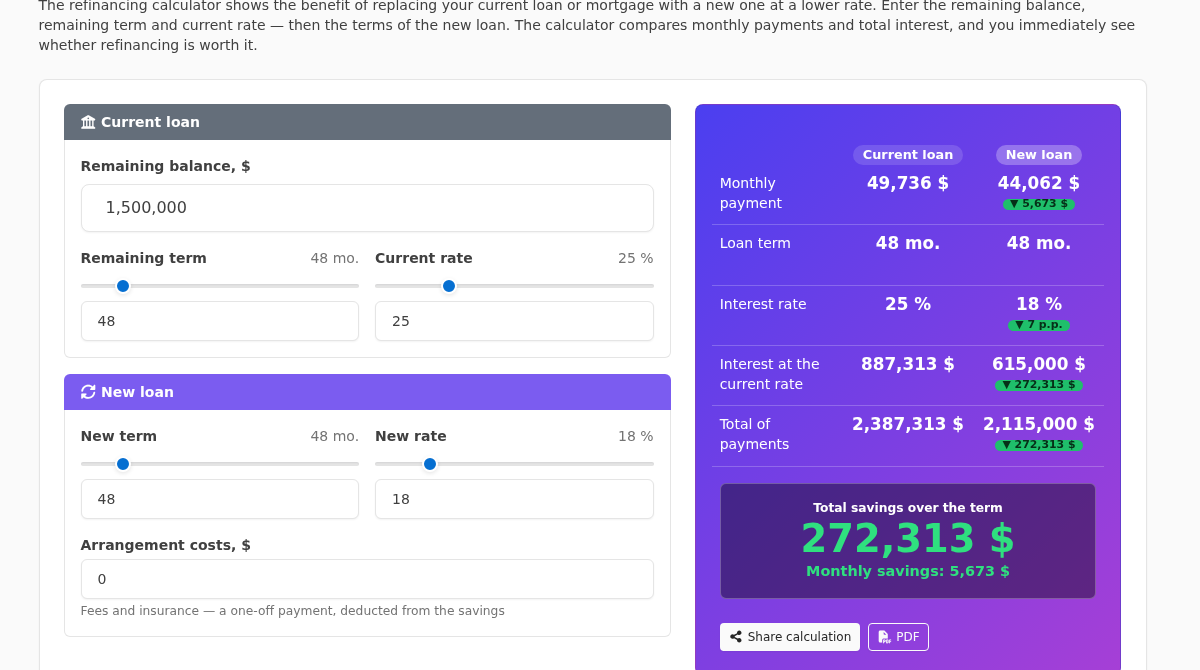
Just three steps. In the “Current loan” block, enter your remaining balance (you can see it in your banking app), the remaining term and your current rate. In the “New loan” block, enter the rate you are offered, the desired term and the arrangement costs. Everything recalculates instantly — moving the sliders is enough.
What the calculator shows
The results panel compares the loans row by row: monthly payment, term, rate, interest and total payments. Green delta pills show how each figure changes, and the dark block at the bottom gives you the headline — your total savings over the term after switching plus the monthly savings. If the numbers are red, switching is not worth it — good to know before visiting a bank.
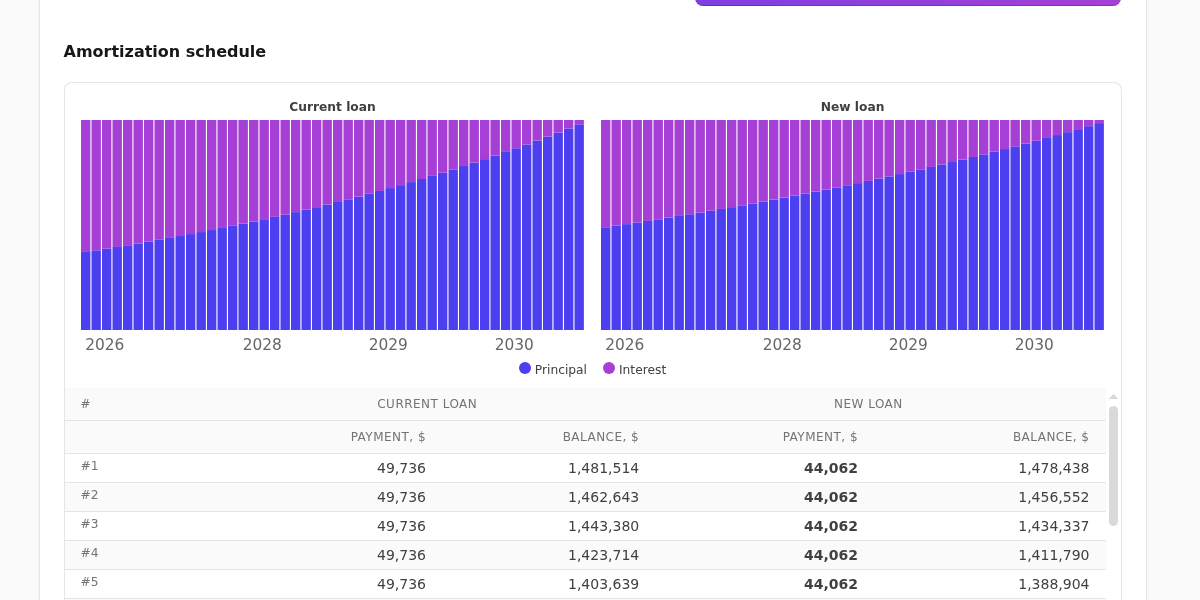
Below is a month-by-month schedule for both loans with repayment charts: you can see how the payment composition changes and how fast the balance drops. You can share the calculation by link (the recipient sees it in the same currency) or print it to PDF — with parameters, totals and the schedule.
For borrowers
Use it as a habit: once a year, check whether money has become cheaper. Take your balance and rate from the bank, enter the advertised “from” terms of a competitor — and within a minute you will know whether it is worth gathering documents. Keep in mind the nuances the calculator highlights indirectly: compare the annual percentage rate (APR), not just the headline rate, check the early repayment fee on your current loan, and do not shorten the term too much if your goal is a lower monthly payment.
For bank staff
The calculator doubles as a work tool. In a meeting with a client, you can enter the parameters of their current loan right on the screen — nothing is stored or sent anywhere — adjust the new terms and show the savings in numbers and charts. A visual “before → after” comparison with the total saving over the term convinces better than any pitch, and the PDF button turns the calculation into a neat document the client takes home. Typical scenarios: a rate cut for payroll clients, consolidating several loans into one (enter the combined balance and the weighted average rate), and refinancing an expensive unsecured loan into a cheaper one.
No-surprise math
The calculator applies the classic annuity formula twice — for the current and for the new rate — and defines savings as the difference between total payments minus one-off arrangement costs. The calculation is preliminary: the exact terms are always set by the bank at approval.
Try it: the loan refinancing calculator is free, requires no sign-up, works in 37 languages and any currency.